MKDOCS Substitute
Current Version: 0.13, January, 31st, 2026
For several years, all of my pages have been generated using a static website generator called "mkdocs" ⧉. This tool is very simple and meets almost all of my requirements, especially when used with the "Material" ⧉. However, I'm always missing a few features, and at some point I started to explore this tool's plugins.
Mkdocs Substitute has become a powerful extension of mkdocs/Material. As the plugin's name suggests, specific text passages/placeholders in Markdown source files can be replaced with any text modules. What's more... with MKDOCS Substitute, you can insert elements such as alerts, badges, toast, freely available icons, modal windows, social media widgets, etc., without having to deal with complicated JavaScript functions or long HTML elements.
INSTALLATION
The repository can be found here: https://pypi.org/project/mkdocs-substitute-plugin/ ⧉
Open the Windows Terminal application and enter this command:
pip install mkdocs-substitute-plugin
The tool should install without any problems. Note the minimum version requirements for mkdocs and upgrade if necessary. MKDOCS Substitute was tested and developed in Python with MKDOCS and Material.
The plugin is enabled in mkdocs.yaml as follows:
plugins:
    - substitute-plugin:
        substitutions_file: substitutions.json
substitutions.json
The substitutions.json file is mandatory. This file defines the substitutions. This guide explains how this works for individual elements. To start, create a file substitutions.json file with this content:
{
    "[icon_01]": "account-convert",
    "[icon_02]": "account-check"
}
This file should be located in the same directory as mkdocs.yaml (usually the root directory of your project). The content you have just placed in this file, will be explained in the following sections of this document. Important: The ´substitution.json´ should not be empty because an empty file will cause errors during the mkdocs build process.
Important information about the build process
MKDOCS Substitute never replaces anything in your original files. The replacement process takes place during the build process, meaning source files – usually Markdown files – remain untouched. MKDOCS Substitute generates a separate section with its own CSS classes for each element. This allows you to place any number of elements of the same type on a page.
BASICS - Simple Substitutions
First, you can use MKDOCS SUBSTITUTE to create any placeholder you want, with text that you want to replace everywhere on all your pages. Example: You want to include a notice on several pages on several pages, right-aligned in red color always with the same text. This would then look like this in the substitutions.json:
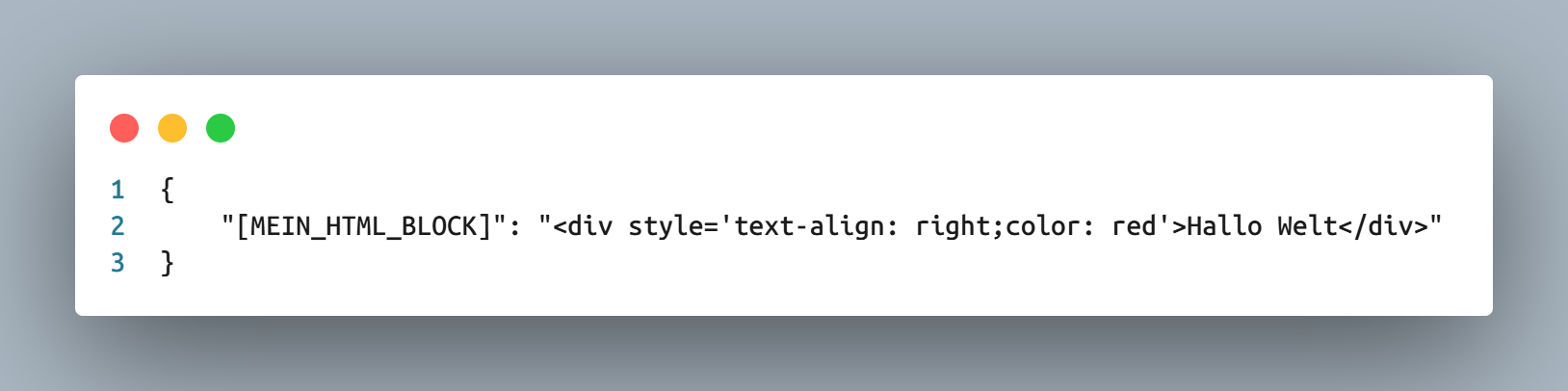
Then simply insert the placeholder into your Markdown files...
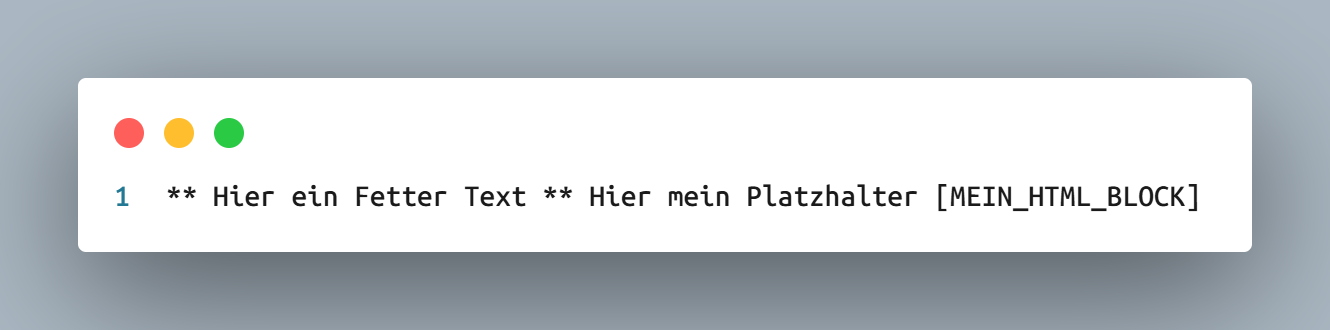
Instead of [ MY_HTML_BLOCK ], Hello World will appear right-aligned in red:
This allows you to define entire HTML blocks and insert them as building blocks at any time. The possible applications are diverse.
MKDOCS Substitute also offers many predefined substitutions. These are defined by beginning a phrase with a square bracket. These elements are now presented in the following sections.
TRIGGER to set the pre-defined elements
To enable MKDOCS Substitute to distinguish the predefined elements from its own replacements, these elements have their own triggers, which always follow the same pattern. For example, an alert must always be defined with "[alert_*" and terminated with "]", where "*" represents any parameter for its naming. The triggers are listed at the beginning of the element descriptions, followed by a concrete example and the parameters (e.g., color, text format) that you can define for the element. The triggers always apply to all pages of your project.
Icons von PICTOGRAMMERS
TRIGGER
"[icon_*]"
Everyone probably knows Fontawesome ⧉ – a web font that contains thousands of icons that can be used in a variety of ways on your website. However, the number of freely available icons is limited. Pictogrammers offers a free alternative. More than 7,000 icons are available there.
To do this, the CSS file for the PICTOGRAMMERS web fonts must be inserted into the mkdocs.yaml file:
extra_css:
    - https://cdn.jsdelivr.net/npm/@mdi/font@7.4.47/css/materialdesignicons.min.css
Icons from there can be easily embedded using MKDOCS Substitute.
Here's how to define an ICON in your substitutions.json:
"[icon_example]": "account-convert",
The name account-convert comes from the overview of available icons, which you can find here:
https://pictogrammers.com/library/mdi/ ⧉
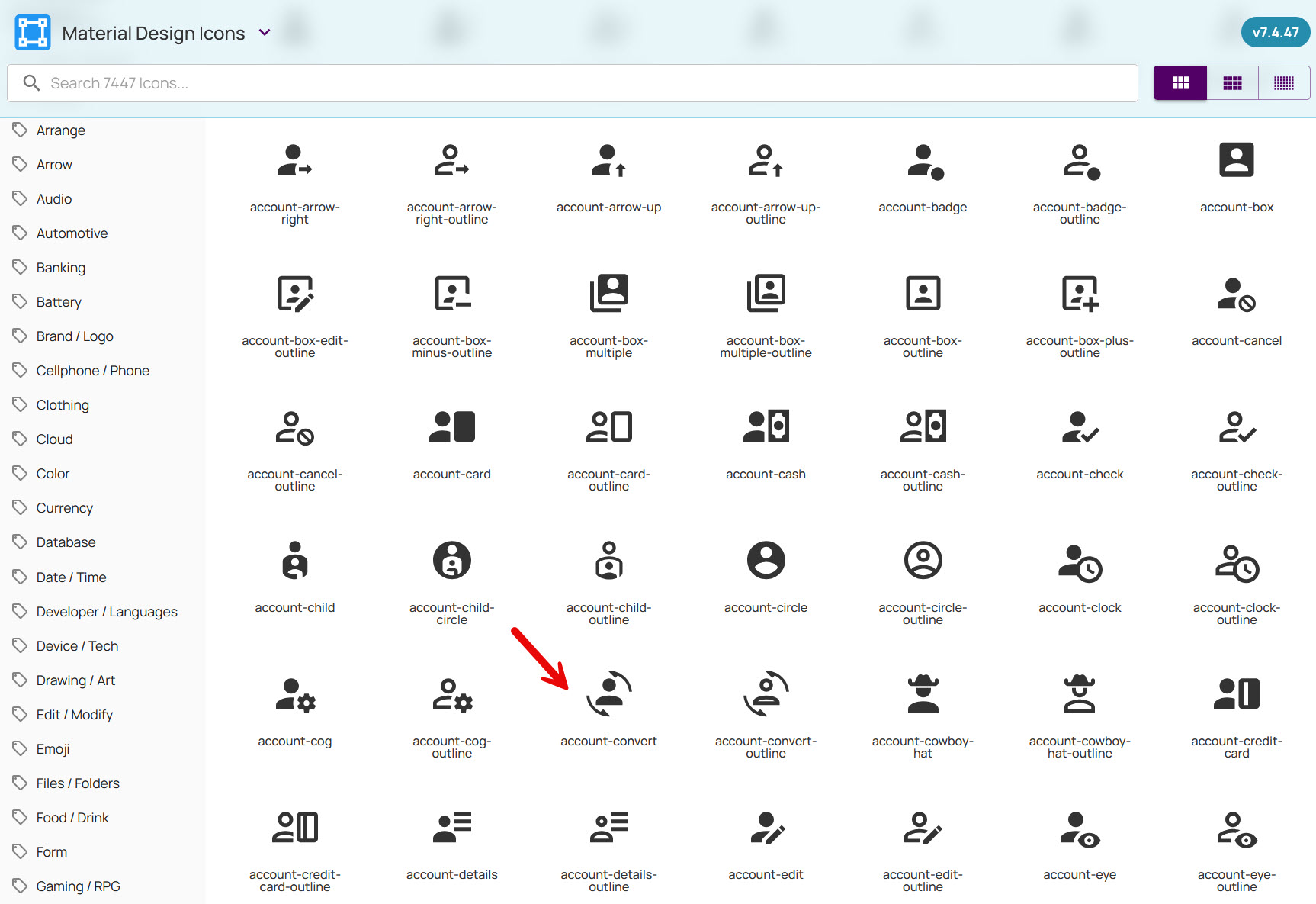
You can also embed these icons in an HTML tag embed so that these icons, for example, take on a different size.
Display the icon larger:
would then result in this display:
WEBSITE ELEMENTS
It's always bothered me that you can't simply insert elements from frameworks like Bootstrap, Foundation, or similar into MKDOCS using Material Design. This is because their CSS classes overlap in their naming conventions. For example, both the Bootstrap framework and the Material Theme have a CSS class called ".container"—mixing the two frameworks would therefore lead to chaos.
So I've recreated some of these elements, and they can be easily integrated into your page using special placeholders.
Alerts
TRIGGER
"[alert_*]"
Bootstrap alerts are similar to admonitions in MKDOCS, but without much content. They are used to display short, concise messages and can also be removed from the page ("dismissible").
Here's how to define an alert in your substitutions.json file:
"[alert_5]": {
    "color" : "success",
    "dismissible" : "true",
    "text" : "Das ist der Alert Text, der im Alert erscheint"
},
This replacement contains three elements:
Parameterübersicht ALERTS:
| Option | Description | Possible Values |
|---|---|---|
| color | Color of the alert background | "success", "alert", "warning", "info" or HEX-Value |
| text | Text of the Alert | Text (can include html) |
| dismissible | Alert can be closed on page | "true" or "false" |
The following parameters are used as colors for this purpose, since this element is subject to the BOOTSTRAP settings:
Toast
TRIGGER
"[toast_*]"
TOASTs are very similar to alerts. However, they have a title bar and a content area. TOASTs are therefore very well suited for differentiating and focusing content.
Here's what a simple TOAST looks like:
Here's how to define a TOAST in your substitutions.json file:
"[toast_5]": {
    "title_text" : "This is the TITLE of the Toast",
    "content" : "This is the Content of the Toast",
    "background_color" : "beige",
    "dismissible" : "true"
},
These are the options available for customizing a TOAST:
Parameterübersicht TOAST:
| Option | Description | Possible Values |
|---|---|---|
| background_color | Color of the alert background | "success", "alert", "warning", "info" or HEX-Value or HTML valid Color-Name |
| title_text | Title of the TOAST | Text (can include html) |
| content | Text of the Alert | Text (can include html) |
| dismissible | Alert can be closed on page | "true" or "false" |
Badges
TRIGGER
"[badge_*]"
Badges are small mini-buttons that can be embedded in running text. Warning messages or special eye-catchers are simple use cases. Configuration in the substitutions.json file is very easy:
"[badge_5]": {
    "background-color" : "blue",
    "text-color" : "white",
    "text" : "Hervorhebung"
},
Parameterübersicht BADGES:
| Option | Description | Possible Values |
|---|---|---|
| background-color | Background-Color of the badge | "success", "alert", "warning", "info" or HEX-Value |
| text-color | Text-Color of the badge | HTML Valid Colorname or HEX Value |
| text | Text of the Badge | Plain Text (should not include HTML) |
This text in your source ...

produces this output:
Einfaches Beispiel: Manchmal macht es Sinn, etwas mit einer Hervorhebung zu präsentieren ...
Sticky Notes
TRIGGER
"[note_*]"
Sticky Notes are special tooltips—small mini-windows that look like Post-it notes and appear when you hover over them with your mouse. You can use these tooltips for background information.
Here's how to configure Sticky Notes:
"[note_example]": {
    "text_hover" : "Wenn Sie hier mit der Maus drüberfahren ...",
    "text_note" : "... wird eine kleine Notiz eingeblendet.",
    "make_italic" : "true",
    "cursor_style" : "help"
}
Example: Wenn Sie hier mit der Maus drüberfahren ... ... dann wird ein kleine Notiz eingeblendet
Parameterübersicht STICKY NOTES:
| Option | Description | Possible Values |
|---|---|---|
| text_hover | Text that will show the note when mouse is over this text | Plain text, no HTML |
| text_note | The text of the note that will appear | Plain text, no HTML |
| make_italic | Show note text in italic style? | "true" or "false" |
| cursor_style | Style of the cursor when hovering over the text | Valid CSS cursor style. See this link for reference ⧉. |
Modal Windows
TRIGGER
"[modal_*]"
MKDOCS Substitute allows you to create modal windows. MKDOCS Substitute utilizes the functionality of micromodal.js. To use it, you must insert a link to the JavaScript library in your mkdocs.yaml file:
extra_javascript:
    - https://unpkg.com/micromodal/dist/micromodal.min.js
Modal-Windows have these properties that you can add and modify in your substitutions.json file:
"[modal_5]": {
    "trigger": "OPEN THE MODAL WINDOW",
    "trigger_text_color" : "blue",
    "trigger_font_weight" : "bold",
    "title" : "THIS IS THE TITLE OF A MODAL WINDOW",
    "content" : "<small>Lorem ipsum dolor sit amet consectetur adipisicing elit. Vel, voluptatum. Magni hic, voluptate debitis esse corporis dolor laudantium quae quo!</small>",
    "padding" : "25px",
    "max_width" : "600px",
    "button_text" : "Got It!",
    "space_title_content" : "1rem",
    "space_content_bottom" : "1rem"

},
Information: All these MODAL Windows are closed by hitting ESC.
Example of a Modal-Window:
OPEN THE MODAL WINDOW
These are the parameters for the Modal-Windows :
Parameters MODAL-WIndows:
| Option | Description | Possible Values |
|---|---|---|
| trigger | Trigger Text for click to open Modal | Plain Text - do not use additional HTML here |
| trigger_text_color | The Color of the Trigger Text | HEX Value or valid HTML Color name |
| trigger_font_weight | The Font-Weight of the Trigger Text | "normal" or "bold" |
| title | The Title of the Modal | Text, can include HTML |
| content | The content if the Modal | Text, can include HTML |
| padding | The Padding of the Modal content | Integer number e.g. 20 - padding to all sites of Modal in px |
| max_width | Define the Maximum Width of the Modal | The width of the Modal at maximum in px |
| button_text | Text on the Close Button | This is the Text on the MODAL Close Button |
| space_title_content | Space between Title and Content | Integer number e.g. 20 (~ 20px) |
| space_content_bottom | Space between Content and Bottom | Integer number e.g. 20 (~ 20px) |
Newsticker
TRIGGER
"[news_*]"
MKDOCS Substitute can place a simple newsticker on your page - this is how to set this up in your substitutions.json:
"[news_3]": {
    "text" : "Lorem ipsum dolor sit amet consectetur adipisicing elit. Vel, voluptatum. Magni hic, voluptate debitis esse corporis dolor laudantium quae quo!",
    "background_color" : "#f9f9f9",
    "text_color" : "darkred",
    "font_weight" : "bold",
    "speed" : "20"
},
This is how the newsticker will look like :
These are the parameters for the newsticker:
Parameterübersicht NEWSTICKER:
| Option | Description | Possible Values |
|---|---|---|
| background-color | Background-Color of the newsticker | "success", "alert", "warning", "info", HEX-Value or Valid HTML Color name |
| text-color | Text-Color of the badge | HTML Valid Colorname or HEX Value |
| text | Text of the Badge | "true" or "false" |
| font-weight | The Weight of the Newsticker Text | "bold" or "normal" |
| speed | The speed of the Newsticker | Integer value (seconds) |
Mastodon Badge
TRIGGER
"[mastodon_*]"
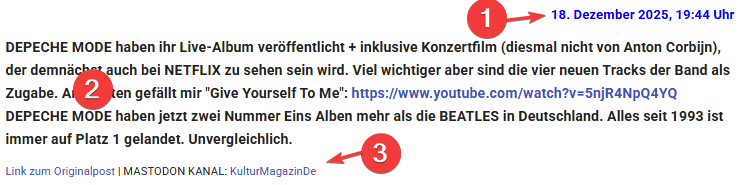
With this Trigger the last post of your MASTODON Channel will be placed on your page. A line displaying the date will be placed to this entry as well as line with a link to the original post and the Mastodon Channel. Therefore the Element contains three CSS Components. One for the Date, another one for the content and a third one the link. You can add your own CSS class to this element. If you do not define the classes a default format will be used (see the screenshot). If you like the standard format you can drop the CSS parameters. The MASTODON username mandatory.
| Option | Description | Possible Values |
|---|---|---|
| mastodon_username | Your mastodon username | ... |
| mastodon_class_date | CSS Class Name for line with date (1) | A CSS class added to markdown file or in embedded CSS File |
| mastodon_class_content | CSS CLass Name for content (2) | A CSS class added to markdown file or in embedded CSS File |
| mastodon_class_link | CSS Class Name for line with link (3) | A CSS class added to markdown file or in embedded CSS File |
"[mastodon_entry1]": {
    "mastodon_username" : "KulturMagazinDe",
    "mastodon_class_date" : "My_CSS_Class_Date",
    "mastodon_class_content" : "My_CSS_Class_Content",
    "mastodon_class_link" : "My_CSS_Class_Link"
}
If you want to use the standard format this entry looks much simpler:
"[mastodon_entry1]": {
    "mastodon_username" : "KulturMagazinDe"
}
Please not - this is not a dynamic element. This element will always show the most recent entry at the time of the build process. It does not show the latest Mastodon entry if you have not re-build the page.
Date Functions
TRIGGER
"[date_*]"
MKDOCS Substitute can set placeholders that show the current date and/or Time in different formats. This is not a dynamic element - it´s show the timestamp and the time of the build process. This might be helpful when you want to show e.g. the last refresh date of the file.
"[date_1]": {
    "date_format" : "%d. %B %Y"
}
This example shows the date as "31. Januar 2026".
The format elements are standard python components:
Parameters Date
| Placeholder | Meaning | Example |
|---|---|---|
| %Y | Year four digits | 2026 |
| %y | Year to digits | 26 |
| %m | Month as number | 01 |
| %B | Monat as name | January |
| %b | Monthname short | Jan |
| %d | Day | 31 |
Parameters Weekday
| Placeholder | Description | Example |
|---|---|---|
| %A | Weekday complete | Saturday |
| %a | Weekday shortcut | Sa |
| %w | Weekday as number (0 = Sunday) | 6 |
Parameters Time
| Placeholder | Description | Example |
|---|---|---|
| %H | Hour (24-Hours-Format) | 17 |
| %I | Hour (12-Hours-Format) | 05 |
| %M | Minute | 34 |
| %S | Second | 12 |
For a more detailed formatting you surround this Element with e.g. your own span or div tags.
SEO Functions
TRIGGER
No trigger is necessary. The function is automatically enabled.
MKDOCS Substitute allows you to access descriptions and keywords defined in the preamble of Markdown files and generate them as META descriptions and META keywords when pages are created. The keywords and descriptions in the preamble are thus replaced by actual tags.
Keine Einrückungen der Präambel
The examples of the Preambles look like as if they where indented to the right. But that is not the case - this areas must be inserted bound to the left without tabs and spaces. An indentation will be interpreted by mkdocs as code formatting and the lines will be displayed as such.
The follwoing functions are automatically enabled with the installation of MKDOCS Substitute—you don't need to add anything to mkdocs.yaml or substitute.json. However, you should then deactivate other plugins with a similar purpose, as duplicate META entries can lead to indexing errors by search engine crawlers.
If MKDOCS Substitute finds two completely identical entries—for example, because one entry was created by the theme itself via the description tag—it will only allow one entry in the generated HTML output file.
Description and Keyword
This is how the entries in the preamble of a Markdown file will then look:
---
title: Willkommen bei Peter Killert.
description: Die Startseite der Homepage von Peter Killert.
keywords:
    - Killert
    - Autor
    - Quadrizepssehnenruptur
---
In the source of your built page you will now see these <meta>-Tags
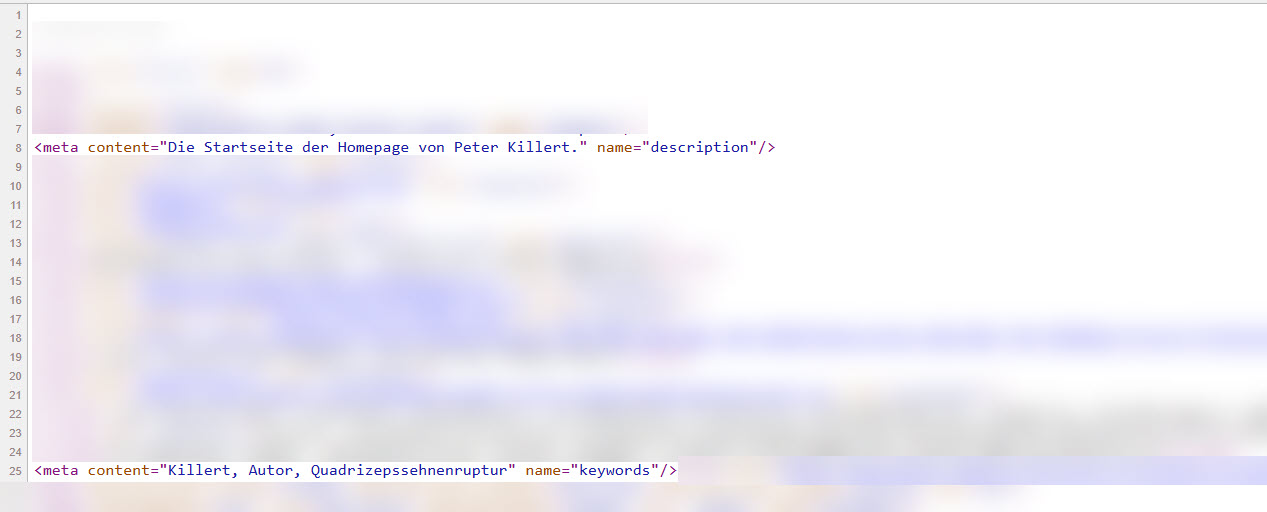
There are many more tags that you insert into the Header of each file:
Robots
---
robots: noindex, nofollow
---
With this tag you can control indexing and following of the search engines.
Possible parameters are ...
noindex, nofollow
index, follow
unavailable_after: 31-Dec-2026
...
OpenGraph
---
og_type: Webseite
og_title: Willkommen bei Peter Killert
og_description: Die Startseite der Homepage von Peter Killert.
og_image: https://www.meineseite.de/linked_image.jpg
og_url: https://www.meineseite.de
og_sitename: www.killert.de
---
og:description should not contain more than 300 characters og:image should have a size of 1200 x 627 Pixels
OpenGraph tags are read by Facebook, LinkedIn, Instagram and other pages.
Summary
A complete Preamble of your markdown file might look like this:
---
title: Willkommen bei Peter Killert.
description: Die Startseite der Homepage von Peter Killert.
keywords:
    - Killert
    - Autor
    - Quadrizepssehnenruptur
og_type: Webseite
og_title: Willkommen bei Peter Killert
og_description: Die Startseite der Homepage von Peter Killert.
og_image: https://www.meineseite.de/linked_image.jpg
og_url: https://www.meineseite.de
og_sitename: www.killert.de
robots: noindex, nofollow
---
FAQ
Here are a few questions that might come up while using MKDOCS Substitute :
Is there an example of the 'substitions.json'?
Yes, an example file with all the elements of this tutorial is available here ⧉.
What does 'Valid HTML Code Color Name' mean?
To define a color in HTML, you can use the name of a color instead of a HEX code. These color names are standardized and understood by all common browsers. You can find an overview of these color names here: www.w3schools.com/tags/ref_colornames.asp ⧉
Can I also use substitutions within HTML tags?
Yes, that's possible. For example, placing a substitution within a DIV tag should work.
Why don't the pre-built elements have more styling parameters?
When selecting the parameters, I focused on the most common and important elements. However, you can 'wrap' an element with another tag and its own CSS class to add even more styling options.
I have a quotation mark in the replacement text. How do I insert it in the JSON file?
The quotation marks in the JSON file delimit the replacement text. If you also want to include a quotation mark within the text itself, you must escape it with a slash () within the replacement text. That is, as \""
During the mkdocs build Process I receive this error message: raise JSONDecodeError ... - what is wrong here?
This error indicates taht the substitions.json file is missing, wrong formatted or empty. When you correct this the build process will work afterwards.
Updates
MKDOCS Substitute is regularly updated and bug-fixed. Occasionally, minor new features are added. You can check the current version via the command line with:
pip show mkdocs-substitute-plugin
You can force a specific update of the mkdocs-substitute-plugin with:
pip install --upgrade --force-reinstall mkdocs-substitute-plugin
Uninstall
Sollten Sie - aus welchen Gründen auch immer - dieses Plugin nicht mehr benötigen, dann können Sie das Pakete auch deinstallieren:
pip uninstall mkdocs-substitute-plugin
Beachten Sie dabei, dass Sie auch diese Einträge in der mkdocs.yaml löschen oder mit einem vorangestellten "#" auskommentieren müssen:
plugins:
    #- substitute-plugin:
    #    substitutions_file: substitutions.json
This will, of course, completely eliminate all functionality. The placeholders will then appear in their source files exactly as they were placed, without any replacements. You would then need to remove those as well.
License
This plugin is free to use. For regular, non-commercial use, I would appreciate a small donation via PayPal. For commercial use, I request a one-time payment of €20, also via PayPal. I do not prohibit or restrict commercial use – this request for this manageable, reasonable payment is an appeal to your fairness. Such worthwhile projects cannot be implemented without a significant time investment.
Support
There is no official support for this package. I work on this package in my sparetime. For questions and detected bugs please send an E-Mail to mkdocs@code-is-poetry.de ✉